Create an AutoBlog

For those people who have a lot blog, maybe they can't manage all of them and probably only update that have a good traffic and higher pagerank, but today we gonna discuss how we update manually all blog we have with automatic especially on blogspot.

Follow this instruction

first step:
+ you should already have blogspot of course...:D

Step 2:
+ Login with your gmail account on your blogspot dashboard, and go to Setting and choose email and mobile tab.[preview screen are below]
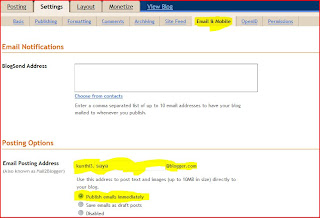


Notice: when you choose "POSTING OPTION" you should supply your email blogger, for this example " kunthi3.saya@blogger.com" [based on the picture above] and it means the blog will start posting automaticly with this secret email.If you done with this step now you just need to find a appropriate RSS feed that suitable with your blog content.

Step 3:
+ Next you should to is go to this url: FeedMyInbox.com[+]
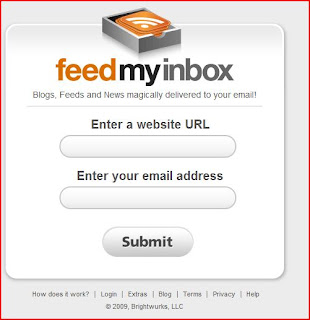

complete all field that requested, like
Enter a website URL : http://preview-shopping.blogspot.com
Enter your Email Address : kunthi3.saya@blogger.com [based on step 2]

Done......!!!, plus minus of using this method is your blog content will exactly same with the blog from the Rss Feed that you taken and of course it much timesaving when you do posting, but also Google doesn't like that[ if you running Google Adsense on your blog advertisement]

Master Boot Record

What you should know about The Master Boot Record (MBR) will be created when you create the first partition on the hard disk. It is very important data structure on the disk. The Master Boot Record contains the Partition Table for the disk and a small amount of executable code for the boot start. The location is always the first sector on the disk.

The first 446 (0x1BE) bytes are MBR itself, the next 64 bytes are the Partition Table, the last two bytes in the sector are a signature word for the sector and are always 0x55AA.

For our disk layout we have MBR:

[change font here]
Physical Sector: Cyl 0, Side 0, Sector 1
000000000 33 C0 8E D0 BC 00 7C FB 50 07 50 1F FC BE 1B 7C 3AZ??.|uP.P.u?.|
000000010 BF 1B 06 50 57 B9 E5 01 F3 A4 CB BE BE 07 B1 04 ?..PW?a.o¤E??.±.
000000020 38 2C 7C 09 75 15 83 C6 10 E2 F5 CD 18 8B 14 8B 8,|.u.??.aoI.‹.‹
000000030 EE 83 C6 10 49 74 16 38 2C 74 F6 BE 10 07 4E AC i??.It.8,to?..N¬
000000040 3C 00 74 FA BB 07 00 B4 0E CD 10 EB F2 89 46 25 <.tu»..?.I.eo‰F%
000000050 96 8A 46 04 B4 06 3C 0E 74 11 B4 0B 3C 0C 74 05 –SF.?.<.t.?.<.t.
000000060 3A C4 75 2B 40 C6 46 25 06 75 24 BB AA 55 50 B4 :Au+@?F%.u$»?UP?
000000070 41 CD 13 58 72 16 81 FB 55 AA 75 10 F6 C1 01 74 AI.Xr.?uU?u.oA.t
000000080 0B 8A E0 88 56 24 C7 06 A1 06 EB 1E 88 66 04 BF .Sa?V$C.?.e.?f.?
000000090 0A 00 B8 01 02 8B DC 33 C9 83 FF 05 7F 03 8B 4E ..?..‹U3E?y..‹N
0000000A0 25 03 4E 02 CD 13 72 29 BE 46 07 81 3E FE 7D 55 %.N.I.r)?F.?>?}U
0000000B0 AA 74 5A 83 EF 05 7F DA 85 F6 75 83 BE 27 07 EB ?tZ?i.U…ou??'.e
0000000C0 8A 98 91 52 99 03 46 08 13 56 0A E8 12 00 5A EB S?‘R™.F..V.e..Ze
0000000D0 D5 4F 74 E4 33 C0 CD 13 EB B8 00 00 00 00 00 00 OOta3AI.e?......
0000000E0 56 33 F6 56 56 52 50 06 53 51 BE 10 00 56 8B F4 V3oVVRP.SQ?..V‹o
0000000F0 50 52 B8 00 42 8A 56 24 CD 13 5A 58 8D 64 10 72 PR?.BSV$I.ZX?d.r
000000100 0A 40 75 01 42 80 C7 02 E2 F7 F8 5E C3 EB 74 49 .@u.B€C.a?o^AetI
000000110 6E 76 61 6C 69 64 20 70 61 72 74 69 74 69 6F 6E nvalid partition
000000120 20 74 61 62 6C 65 00 45 72 72 6F 72 20 6C 6F 61 table.Error loa
000000130 64 69 6E 67 20 6F 70 65 72 61 74 69 6E 67 20 73 ding operating s
000000140 79 73 74 65 6D 00 4D 69 73 73 69 6E 67 20 6F 70 ystem.Missing op
000000150 65 72 61 74 69 6E 67 20 73 79 73 74 65 6D 00 00 erating system..
000000160 00 00 00 00 00 00 00 00 00 00 00 00 00 00 00 00 ................
000000170 00 00 00 00 00 00 00 00 00 00 00 00 00 00 00 00 ................
000000180 00 00 00 8B FC 1E 57 8B F5 CB 00 00 00 00 00 00 ...‹u.W‹oE......
000000190 00 00 00 00 00 00 00 00 00 00 00 00 00 00 00 00 ................
0000001A0 00 00 00 00 00 00 00 00 00 00 00 00 00 00 00 00 ................
0000001B0 00 00 00 00 00 00 00 00 A6 34 1F BA 00 00 80 01 ........¦4.?..€.
0000001C0 01 00 07 FE 7F 3E 3F 00 00 00 40 32 4E 00 00 00 ...?>?...@2N...
0000001D0 41 3F 06 FE 7F 64 7F 32 4E 00 A6 50 09 00 00 00 A?.?d2N.¦P....
0000001E0 41 65 0F FE BF 4A 25 83 57 00 66 61 38 00 00 00 Ae.??J%?W.fa8...
0000001F0 00 00 00 00 00 00 00 00 00 00 00 00 00 00 55 AA ..............U?

What will happen if the first sector has been damaged (by virus, for example)?

Lets overwrite the first 16 bytes with zeros.

000000000 00 00 00 00 00 00 00 00 00 00 00 00 00 00 00 00 ................
000000010 BF 1B 06 50 57 B9 E5 01 F3 A4 CB BE BE 07 B1 04 ?..PW?a.o¤E??.±.


When we try to boot after hardware testing procedures, we see just blank screen without any messages. It means the piece of code at the beginning of the MBR could not be executed properly. That’s why even error messages could not be displayed. However, if we boot from the floppy, we can see FAT partition, files on it and we are able to perform standard operations like file copy, program execution... It happens because in our example only part of the MBR has been damaged which does not allow the system to boot properly. However, the partition table is safe and we can access our drives when we boot from the operating system installed on the other drive.

What will happen if sector signature (last word 0x55AA) has been removed or damaged?

Lets write zeros to the location of sector signature.

Physical Sector: Cyl 0, Side 0, Sector 1
0000001E0 41 65 0F FE BF 4A 25 83 57 00 66 61 38 00 00 00 Ae.??J%?W.fa8...
0000001F0 00 00 00 00 00 00 00 00 00 00 00 00 00 00 00 00 ................

When we try to boot now, we see an error message like "Operating System not found".

Thus the first thing if computer does not boot is to run Disk Viewer and check the first physical sector on HDD, whether it looks like valid MBR or not:

* check, may be it's filled up with zeros or any other single character
* check whether error messages (like you can see above "Invalid partition table"...) are present or not
* check whether disk signature (0x55AA) is present or not

The simplest way to repair or re-create MBR is to run Microsoft's standard utility called FDISK with a parameter /MBR, like

A:\> FDISK.EXE /MBR

FDISK is a standard utility included in MS-DOS, Windows 95, 98, ME.

If you have Windows NT / 2000 / XP, you can boot from startup floppy disks or CD-ROM, choose repair option during setup, and run Recovery Console. When you are logged on, you can run FIXMBR command to fix MBR.

Also you can use third party MBR recovery software or if you've created MBR backup, restore it from there (Active@ Partition Recovery has such capabilities).

What will happen if the first sector is bad/unreadable?

Most likely we'll get the same black screen, which we got when trying to boot. When you try to read it using Disk Viewer/Editor you should get an error message saying that sector is unreadable. In this case recovery software is unable to help you to bring HDD back to the working condition, i.e. physical partition recovery is not possible. The only thing that can be done is to scan and search for partitions (i.e. perform virtual partition recovery), and in case if something is found - display them and give the user an opportunity to save important data to another location. Third party software, like Active@ UNERASER[http://www.partition-recovery.com/], will help you here.

Source: NTFS.com[+]

Biggest Forum List

Another way to make traffic to your website or blog is to make link exchange between other blog/website, but know we can make do follow from forum-forum biggest all over the internet that I know but not all of them just a few. Mostly that I have Join and I keep continue to register to them all, but appropriate in computer topic of course or similiar :D

here's a few list the biggest and active members that I found all over the Internet:

http://forums.digitalpoint.com
http://www.sitepoint.com/forums
http://www.webmasterforums.com
http://www.allcoolforum.com
http://www.warriorforum.com
http://forums.webicy.com
http://forums.techguy.org/
http://thehyipforum.com
http://www.webmasterforumsonline.com
http://www.webmasters.am/forum
http://www.webmasterforums.net
http://www.devhunters.com
http://www.webmaster-forum.net
http://www.geekvillage.com/forums
http://www.zymic.com/forum
http://www.webmastershelp.com
http://www.webmasterdesk.org
http://www.webmasterground.com
http://developers.evrsoft.com/forum
http://www.websitebabble.com
http://www.talkingcity.com
http://www.australianwebmaster.com
http://www.wtricks.com
http://www.forums.webzonetalk.com
http://www.htmlforums.com
http://www.searchbliss.com/forum
http://www.webmasterize.com
http://www.webmasterserve.com
http://www.freehostforum.com
http://www.seorefugee.com/forums
http://www.cre8asiteforums.com/forums
http://forums.seo.ph
http://forums.delphiforums.com
http://www.web-mastery.net
http://www.webworkshop.net/seoforum/index.php
http://www.webproworld.com
http://www.bzimage.org
http://www.v7n.com/forums
http://www.dnforum.com
http://www.webcosmoforums.com
http://forums.webicy.com
http://forum.hittail.com/phpbb2/index.php
http://www.affiliateseeking.com/forums
http://siteownersforums.com/index.php
http://www.webmaster-forums.net
http://www.geekpoint.net
http://www.smallbusinessforums.org
http://forums.ukwebmasterworld.com
http://www.experienceadvertising.com/forum
http://opensourcephoto.net/forum
http://forums.seochat.com
http://forums.searchenginewatch.com
http://www.ihelpyou.com/forums
http://dishnews.medianetwork.co.in/yabb2/YaBB.pl
http://www.businesss-forum.com
http://www.9mb.com
http://acapella.harmony-central.com/forums
http://forums.seroundtable.com
http://www.submitexpress.com/bbs
http://www.startups.co.uk/6678842908…04/forums.html
http://www.webmaster-talk.com
http://forums.comicbookresources.com
http://www.clicks.ws/forum/index.php
http://www.acorndomains.co.uk
http://forums.onlinebookclub.org
http://www.ableton.com/forum
http://www.davidcastle.org/BB
http://www.webtalkforums.com
http://www.bloggapedia.com/forum
http://www.bloggertalk.com/forum.php
http://paymentprocessing.cc
http://www.directoryjunction.com/forums
http://www.internetmarketingforums.net
http://www.lex224.com/forums/index.php
http://forum.joomla.org
http://forum.mambo-foundation.org/index.php
http://www.simplemachines.org/community/index.php
http://www.namepros.com/index.php
http://loanofficerforum.com/forum
http://iq69.com/forums
http://forum.hot4s.com.au
http://forums.mysql.com
http://forums.amd.com/forum
http://softwarecommunity.intel.com/i…y/en-us/Forums
http://forums.cnet.com
http://seotalk.me
dianetwork.co.in
https://www.computerbb.org
http://forum.vbulletinsetup.com
http://www.irishwebmasterforum.com
http://www.app-developers.com
http://forums.stuffdaily.com
http://forums.seo.com
http://www.webdigity.com
http://www.inboundlinksforum.com
http://forums.gentoo.org
http://ubuntuforums.org
http://forum.textpattern.com
http://talk.iwebtool.com
http://www.frogengine.com/forum
http://www.capitaltheory.com
http://www.smsbucket.com/forums/
6pins.com/blog/
acapella.harmony-central.com/forums/
atdinner.com/excellent-forums/
bzimage.org/
forum.hittail.com/phpbb2/index.php
forum.hot4s.com.au/
forum.vbulletinsetup.com
forums.amd.com/forum/categori…=11&entercat=y
forums.cnet.com/
forums.comicbookresources.com/
forums.digitalpoint.com
forums.microsoft.com/MSDN/def…ID=20&SiteID=1
forums.mysql.com/
forums.onlinebookclub.org/
forums.oracle.com/forums/cate…?categoryID=84
forums.seroundtable.com/
forums.ukwebmasterworld.com/
forums.webcosmo.com
iq69.com/forums/
paymentprocessing.cc/
siteownersforums.com/index.php
softwarecommunity.intel.com/i…/en-us/Forums/
9mb.com
ableton.com/forum/
acorndomains.co.uk/
affiliateseeking.com/forums
bodybuildingweb.net/forum/
businesss-forum.com
clicks.ws/
davidcastle.org/BB/
dnforum.com/
earnersforum.com/forumsindex.php
experienceadvertising.com/forum/
irishwebmasterforum.com
musclesweb.net/forum/
pakadtrader.com/forum/index.php
sitepoint.com/forums/
smallbusinessforums.org/
startups.co.uk/
submitexpress.com/bbs/
v7n.com/forums/
wareswapper.com/
warriorforum.com/forum/
warriorforum.com/forum/default.asp
webicy.com/
webmaster-forums.net/
webmaster-talk.com/
computerbb.org/
geekpoint.net

but if you looking forum based on [let we say....] member, topic, traffic, alexa ranking or version of forum here the address that you can visit and choose the option that I mention above, here's the web address []

see you there, and don't forget if you register on the above forum for the refferal use my nick ok, that would be [oby_one]

Ethernet Cables How To

Some people still confuse how Network administrator, EDP or even Sysadmin created LAN [Local Area Network] so each computer get connected via cable that plug behind CPU, but now I will teach you with picture preview include :D no more secret dude [lol]

What you need:
---------------
+ Required :
~ Cable - bulk Category 5, 5e, 6 or 7 cable
~ Wire Cutters - to cut and strip the cable if necessary
~ For Patch Cables: RJ45 Plugs
~ RJ45 Crimper [Tang Krimping, in Indonesia language :D]
~ For Fixed Wiring: RJ45 Jacks
~ 110 Punch Down Tool

+ Recommended:
~ Wire Stripper
~ Cable Tester

* About the Cable
You can find bulk supplies of the cable at many computer stores or most electrical or home centers. You want UTP (Unshielded Twisted Pair) Category 5 cable for basic 10/100 functionality. You want CAT 5e for gigabit (1000BaseT) operation and CAT 6 or 7 gives you a measure of future proofing. Bulk cable comes in many types, there are 2 basic categories, solid and braided cable. Braided cable tends to work better in patch applications for desktop use. It is more flexible and resilient than solid cable and easier to work with, but really meant for shorter lengths. Solid cable is meant for longer runs in a fixed position. Plenum rated cable must be used whenever the cable travels through an air circulation space. For example, above a false ceiling or below a raised floor. It may be difficult or impossible to tell from the package what type of cable it is, so peal out an end and investigate.

Here is what the internals of the cable look like:
Internal Cable Structure and Color Coding


Inside the cable, there are 8 color coded wires. These wires are twisted into 4 pairs of wires, each pair has a common color theme. One wire in the pair being a solid or primarily solid colored wire and the other being a primarily white wire with a colored stripe (Sometimes cables won't have any color on the striped wire, the only way to tell which is which is to check which wire it is twisted around). Examples of the naming schemes used are: Orange (alternatively Orange/White) for the solid colored wire and White/Orange for the striped cable. The twists are extremely important. They are there to counteract noise and interference. It is important to wire according to a standard to get proper performance from the cable. The TIA/EIA-568-A specifies two wiring standards for an 8-position modular connector such as RJ45. The two wiring standards, T568A and T568B vary only in the arrangement of the colored pairs. Tom writes to say "...sources suggest using T568A cabling since T568B is the AT&T standard, but the US Government specifies T568A since it matches USOC cabling for pairs 1 & 2, which allows it to work for 1/2 line phones...". Your choice might be determined by the need to match existing wiring, jacks or personal preference, but you should maintain consistency. I've shown both below for straight through cabling and just T568B for cross over cabling.

About RJ45 Plugs and Jacks:
+++++++++++++++++++++
The RJ45 plug is an 8-position modular connector that looks like a large phone plug. There are a couple variations available. The primary variation you need to pay attention to is whether the connector is intended for braided or solid wire. For braided/stranded wires, the connector has sharp pointed contacts that actually pierce the wire. For solid wires, the connector has fingers which cut through the insulation and make contact with the wire by grasping it from both sides. The connector is the weak point in an ethernet cable, choosing the wrong one will often cause grief later. If you just walk into a computer store, it's nearly impossible to tell what type of plug it is. You may be able to determine what type it is by crimping one without a cable.

RJ45 jacks come in a variety styles intended for several different mounting options. The choice is one of requirements and preference. RJ45 jacks are designed to work only with solid cable. Most jacks come labeled with color codes for either T568A, T568B or both. Make sure you end up with the correct one.

Here is a diagram and pin out of RJ45


Ethernet Cable Pin Outs:
++++++++++++++++++
There are two basic cable pin outs. A straight through cable, which is used to connect to a hub or switch, and a cross over cable used to operate in a peer-to-peer fashion without a hub/switch. Generally all fixed wiring should be run as straight through. Some ethernet interfaces can cross and un-cross a cable automatically as needed, a handy feature.

Standard, Straight-Through Wiring (both ends are the same):
=============================================


Cross Over Cable (T568B):
===================


+Note: The cross over cable layout is suitable for 1000Base-T operation, all 4 pairs are crossed.

How to wire Ethernet Patch Cables:
1. Strip off about 2 inches of the cable sheath.
2. Untwist the pairs - don't untwist them beyond what you have exposed, the more untwisted cable you have the worse the problems you can run into.
3. Align the colored wires according to the diagrams above.
4. Trim all the wires to the same length, about 1/2" to 3/4" left exposed from the sheath.
5. Insert the wires into the RJ45 plug - make sure each wire is fully inserted to the front of the RJ45 plug and in the correct order. The sheath of the cable should extend into the RJ45 plug by about 1/2" and will be held in place by the crimp.
6. Crimp the RJ45 plug with the crimper tool.
7. Verify the wires ended up the right order and that the wires extend to the front of the RJ45 plug and make good contact with the metal contacts in the RJ45 plug
8. Cut the cable to length - make sure it is more than long enough for your needs.
9. Repeat the above steps for the second RJ45 plug.

How to wire fixed Ethernet Cables:
1. Run the full length of cable in place, from endpoint to endpoint, making sure to leave excess.
2. At one end, cut the wire to length leaving enough length to work, but not too much excess.
3. Strip off about 2 inches of the cable sheath.
4. Align each of the colored wires according to the layout of the jack.
5. Use the punch down tool to insert each wire into the jack.
6. Repeat the above steps for the second RJ45 jack.

If a cable tester is available, use it to verify the proper connectivity of the cable. That should be it, if your cable doesn't turn out, look closely at each end and see if you can find the problem. Often a wire ended up in the wrong place or one of the wires is making no contact or poor contact. Also double check the color coding to verify it is correct. If you see a mistake or problem, cut the end off and start again. A cable tester is invaluable at identifying and highlighting these issues.

When sizing cables remember that an end to end connection should not extend more than 100m (~328ft). Try to minimize the cable length, the longer the cable becomes, the more it may affect performance. This is usually noticeable as a gradual decrease in speed and increase in latency.
--------------------------
NOTES:

Power over Ethernet (PoE):
Power over Ethernet has been implemented in many variations before IEEE standardized 802.3af. 802.3af specifies the ability to supply an endpoint with 48V DC at up 350mA or 16.8W. The endpoint must be capable of receiving power on either the data pairs [Mode A] (often called phantom power) or the unused pairs [Mode B] in 100Base-TX. PoE can be used with any ethernet configuration, including 10Base-T, 100Base-TX and 1000Base-T. Power is only supplied when a valid PoE endpoint is detected by using a low voltage probe to look for the PoE signature on the endpoint. PoE power is typically supplied in one of two ways, either the host ethernet switch provides the power, or a "midspan" device is plugged in between the switch and endpoints and supplies the power. No special cabling is required.


Protocol Details:


Cable Category Details:


Source:goes to this sign[+]

Drive Twitter Traffic using TwitterFeed


Twitter[] is one of few social community and become large visitor each day, but today we gonna make this Twitter application is use full for drive traffic to our blog[]/website through RSS Feed, so the point is, each time you update your blog it's become otomatis all follower that follow you on twitter. They will receive posting that you write on your blog/web [pretty cool eh.... :D] that's mean if you have 1.000 follower, each follower will receive a an article or post, that's it. Enough for explanation, here's what you have to do...

First of all go to this website, it's call TwitterFeed[]
what is this --> Twitterfeed is a service that will automatically twitter any post that you publish on your blog. This makes it easy that you don't have to manually enter updates into Twitter, but of course you don't just want to set up your TwitterFeed and ignore Twitter either. TwitterFeed automatically adds a link to your latest blog post in your Twitter feed using your site’s RSS feed.

You need to set up a Twitter account and also your OpenID account because the information for both of these accounts is needed to set up your TwitterFeed account. If you do not have these, please visit twitter.com[] and http://openid.net/ to set those up following the instructions on the site. You also need Your RSS Feed url.

+ next thing that you should do is sign in with your account, if you don't have one, make it.... you must register, after that log in and you will take to the page with a link that reads "Go to my Twitterfeed [or create a new one]. Click on that link

+ Click on the link that reads "create a new link". You will see a box that reads "create a new (blank) feed". In the (blank) is a drop-down box. Make sure that you have selected "twitter" in this box

+ Enter the requested information in the form such as:
* Username: Fill with username of your twitter account
* Password: Fill with your twitter password
* RSS[link] Feed URL: Fill with you blog URL includes /atom.xml.
* Update frequency: Fill with your selection
* Post up to: Choose some posts you want to display
* Include…: Choose title & description if you want to display the article consist of title and description, or you may choose another one.
* shorten link through: Choose the link shorten service
* Post new items based on: leave it as pubDate
* Prefix each tweet with: you may leave as blank

Wait 12-24 hours and then check your Twitter profile to make sure that your feed is automatically updating. If it's not, return to TwitterFeed. Enter the site the same way as before and then click on "my feeds" at the top right corner of the page. Make sure your feed is on the list. Click to edit. See if it shows up on Twitter. If not, contact TwitterFeed's help service.

A few advantages of using TwitterFeed is following;
# The main advantage of placing the blog feed into twitter is that your blog articles will automatically be sent to your twitter messages, though not all content of the articles will be sent, but only the title or the top paragraph including the link to your post.

# Twitterfeed is a service that will automatically twitter any post that you publish on your blog. This makes it easy that you don't have to manually enter updates into Twitter, but of course you don't just want to set up your TwitterFeed and ignore Twitter either. so the idea of this article is adds a link to your latest blog post in your Twitter feed using your site’s RSS feed.

Thanks to Temi, who write and make thread on this Forum[] usefull for drive more traffic to our blog :D, keep rock and don't forget about iTrader, I'm still waiting and please don't banned me coz I take your article.... :D lol

Move Firefox Bookmark to another Computer


Still curios about move your Bookmark to another PC or Notebook so you don't have to visit each page again and make bookmark, AGAIN.....!!! just like the picture in above, it will spend more time to visit one by one again..... ,here how to make happen.

open your Firefox browser and then go to Bookmark > Organize Bookmark [click] it will open new windows.

and then in new window you can do what exactly, Import, Export, Backup or even Restore your bookmark, but in this case we want to move our bookmark to another PC or Notebook. You just need save it first on your old computer and save it in storage device like USB Flass drive, HDD external or even floopy disk [i think this one doesn't exist anymore]

after you click Organize Bookmark, then click import and Backup [this in Firefox Version 3.0]. and choose Export HTML and save with name you wanted, I recommended in your removable device that already mention in above. After that in your new computer or Notebook do like exactly what you do before but in this time choose Import HTML[open new windows] > From an HTML File > Next > Find the files that you have save it in your Removable storage and click OPEN.. That it your done,

To make more suitable view you can delete unwanted bookmark that include on Firefox Bookmark default. Enjoy... :D

Turn off the Windows Picture and Fax Viewer as the Default Image Viewer

You can also change the file associations for the specific file types you want.

1.Open the Windows Explorer
2.Go to Tools / Folder Options / File Types
3.Scroll down to the extension you want to change
4.Click on the Change button
5.Select the program you want to associate with that extension
6.Click on the OK button

If the Windows Picture and Fax Viewer is set as the default for many of your graphic file types, you can remove it so other graphics programs can be used.

1.Run Regedit
2.Go to HKEY_CLASSES_ROOT/SystemFileAssociations/image/ShellEx /ContextMenuHandlers
3.Delete the key ShellImagePreview

Move Paypal Balance to Local Bank Account


For in Indonesia, paypal is one of few virtual bank that we can find all over on internet,for those who have a lot balance on it would be more savety if their move[] their balance to conventional bank like Mandiri Bank, BCA bank, Simpeda Bank or similiar, but they would be face on difficult problem on transfering because they don't know what each code for each bank that available on Indonesia, but now I can give you the complete list of bank code that you can move your balance from paypal to local bank specially in Indonesia, here's the list;

BANK INDONESIA 0010016
PT. BANK RAKYAT INDONESIA (Persero) Tbk 0020307
PT. BANK EKSPOR INDONESIA (PERSERO) 0030012
PT. BANK MANDIRI (PERSERO) Tbk. 0080606
PT. BANK NEGARA INDONESIA 1946 (Persero) Tbk. 0090010
BNI SYARIAH 0090010
PT. BANK DANAMON INDONESIA INDONESIA Tbk 0111274
PT. BANK PERMATA Tbk.0130307
PT. BANK CENTRAL ASIA Tbk. 0140012
PT. BANK INTERNATIONAL INDONESIA Tbk. 0160131
PT. BANK PAN INDONESIA Tbk. / PT. PANIN BANK Tbk. 0190017
PT. BANK NIAGA Tbk. 0220026
PT. BANK UOB BUANA, TBK 0230016
PT. LIPPO BANK 0261399
PT. BANK NILAI INTI SARI PENJIMPAN Tbk. 0280024
AMERICAN EXPRESS BANK LTD. 0300302
CITIBANK NA 0310305
JPMORGAN CHASE BANK, NA 0320308
BANK OF AMERICA , NA 0330301
PT. BANK MULTICOR / PT. BANK WINDU KENTJANA INTERNASIONAL 0360300
PT. BANK ARTHA GRAHA INTERNASIONAL, TBK 0370028
THE BANGKOK BANK PCL 0400309
THE HONGKONG and SHANGHAI BANKING CORP 0410302
THE BANK OF TOKYO MITSUBISHI UFJ LTD. 0420305
PT. BANK SUMITOMO MITSUI INDONESIA 0450304
PT. BANK DBS INDONESIA 0460307
PT. BANK RESONA PERDANIA 0470300
PT. BANK MIZUHO INDONESIA 0480303
STANDARD CHARTERED BANK 0500306
ALGEMENE BANK NEDERLAND AMRO BANK N.V. / ABN AMRO BANK NV. 0520302
PT. BANK CAPITAL INDONESIA 0540308
PT. BANK BNP PARIBAS INDONESIA 0570307
PT. BANK UOB INDONESIA 0580300
KOREA EXCHANGE BANK DANAMON / PT. BANK KEB INDONESIA 0590303
PT. BANK RABOBANK INTERNATIONAL INDONESIA 0600303
PT. ANZ PANIN BANK 0610306
DEUTSCHE BANK AG 0670304
PT. BANK WOORI INDONESIA 0680307
BANK OF CHINA LIMITED 0690300
PT. BANK BUMI ARTA 0760010
PT. BANK EKONOMI RAHARJA 0870010
PT. BANK ANTAR DAERAH 0880055
PT. HAGABANK INDONESIA / PT. BANK HAGA 0890016
PT. BANK IFI 0930015
PT. BANK CENTURY Tbk. 0950011
BANK MAYAPADA INTERNATIONAL / PT. BANK MAYAPADA Tbk. 0970017
PT. BANK PEMBANGUNAN DAERAH JAWA BARAT /
PT. BANK PEMBANGUNAN DAERAH JABAR DAN BANTEN 1100093
PT. BANK PEMBANGUNAN DAERAH DKI JAKARTA / BANK DKI 1110164
PT. BANK PEMBANGUNAN DAERAH DIY / YOGYAKARTA 1120015
PT. BANK PEMBANGUNAN DAERAH JAWA TENGAH 1130348
PT. BANK PEMBANGUNAN DAERAH JATIM 1140383
PT. BANK PEMBANGUNAN DAERAH JAMBI 1150014
PT. BPD ISTIMEWA ACEH 1160033
PT. BANK PEMBANGUNAN DAERAH SUMUT 1170201
PT. BANK PEMBANGUNAN DAERAH SUMATERA BARAT / PT. BANK NAGARI 1180259
PT. BANK PEMBANGUNAN DAERAH RIAU 1190016
PT. BANK PEMBANGUNAN DAERAH SUMATERA SELATAN 1200142
PT. BANK PEMBANGUNAN DAERAH LAMPUNG 1210051
PT. BANK PEMBANGUNAN DAERAH KALIMANTAN SELATAN 1220012
PT. BANK PEMBANGUNAN DAERAH KALIMANTAN BARAT 1230015
PT. BANK PEMBANGUNAN DAERAH KALIMANTAN TIMUR 1240018
PT. BANK PEMBANGUNAN DAERAH KALTENG 1250011
PT. BANK PEMBANGUNAN DAERAH SULAWESI SELATAN 1260027
PT. BANK PEMBANGUNAN DAERAH SULAWESI UTARA 1270091
PT. BANK PEMBANGUNAN DAERAH NTB / NUSA TENGGARA BARAT 1280010
PT. BANK PEMBANGUNAN DAERAH BALI 1290013
BANK PEMBANGUNAN DAERAH NUSA TENGGARA TIMUR 1300013
PT. BANK PEMBANGUNAN DAERAH MALUKU 1310016
PT. BANK PEMBANGUNAN DAERAH PAPUA 1320019
PT. BPD BENGKULU 1330012
PT. BANK PEMBANGUNAN DAERAH SULAWESI TENGAH 1340015
PT. BANK PEMBANGUNAN DAERAH SULAWESI TENGGARA 1350018
PT. BANK NUSANTARA PARAHYANGAN 1450028
PT. BANK SWADESI Tbk. 1460021
BANK MUAMALAT INDONESIA / PT. BANK MUAMALAT INDONESIA 1470011
PT. BANK MESTIKA DHARMA 1510049
PT. BANK METRO EKSPRESS 1520013
PT. BANK SINARMAS 1530016
PT. BANK MASPION INDONESIA 1570021
PT. BANK HAGAKITA 1590014
PT. BANK GANESHA 1610017
PT.HALIM INDONESIA BANK / PT. BANK HALIM INDONESIA / PT. BANK ICBC INDONESIA 1640058
PT. BANK HARMONI INTERNASIONAL 1660012
PT. BANK KESAWAN 1670099
PT. BANK TABUNGAN NEGARA (Persero) /
PT. BANK TABUNGAN NEGARA (PERSERO) SYARIAH 2000024
PT. BANK HS 1906 / PT. Bank Himpunan Saudara 2120027
B.T. PENSIUNAN NASIONAL / PT. BANK BTPN /
PT. BANK TABUNGAN PENSIUNAN NASIONAL 2130101
PT. BANK SWAGUNA 4050072
PT. BANK JASA ARTA 4220051
PT. BANK MEGA Tbk. 4260176
PT. BANK UMUM KOPERASI INDONESIA (BUKOPIN) / PT. BANK BUKOPIN Tbk. 4410010
PT. BANK SYARIAH MANDIRI Tbk. 4510017
PT. BANK BISNIS INTERNATIONAL 4590037
PT. BANK SRI PARTHA 4660019
PT. BANK JASA JAKARTA 4720014
PT. BANK BINTANG MANUNGGAL / PT. BANK HANA 4840017
PT. BANK BUMI PUTERA Tbk. 4850010
PT. BANK YUDHA BHAKTI 4900012
PT. BANK MITRANIAGA 4910015
PT. AGRONIAGA BANK 4940014
PT. BANK INDOMONEX 4980016
PT. BANK ROYAL INDONESIA 5010011
ALFINDO SEJAHTERA BANK / PT. BANK ALFINDO 5030017
PT. BANK SYARIAH MEGA INDONESIA 5060016
PT. BANK INA PERDANA 5130014
PT. BANK HARFA 5170016
PT. PRIMA MASTER BANK 5200025
PT. BANK PERSYARIKATAN INDONESIA 5210031
PT. BANK DIPO INTERNATIONAL 5230011
PT. BANK AKITA 5250046
PT. BANK LIMAN INTERNATIONAL 5260010
PT. ANGLOMAS INTERNATIONAL BANK 5310012
PT. BANK KESEJAHTERAAN EKONOMI 5350014
PT. BANK UIB 5360017
PT. BANK ARTOS INDONESIA 5420025
PT. BANK PURBA DANARTA 5470017
PT. BANK MULTIARTA SENTOSA 5480010
PT. BANK MAYORA INDONESIA 5530012
PT. BANK INDEX SELINDO 5550018
PT. BANK EKSEKUTIF INTERNASIONAL 5580017
PT. CENTRATAMA NASIONAL BANK 5590036
PT. BANK FAMA INTERNATIONAL 5620029
PT. BANK SINAR HARAPAN BALI 5640012
PT. BANK VICTORIA INTERNATIONAL 5660018
PT. BANK HARDA INTERNASIONAL 5670011
PT. BANK FINCONESIA 9450305
PT. BANK MAYBANK INDOCORP 9470301
PT. BANK OCBC INDONESIA 9480304
PT. BANK CHINATRUST INDONESIA 9490307
PT. BANK COMMONWEALTH 9500307

but if you still don't get your code bank that I mention above, you can go to this url, just find by scroll one by one. The url goes here click BCA []

that all for today, Inspired by "how to move my account balance on paypal to local bank" just cross on my mind, I hope it usefull to all, leave comment if you like my post or maybe make some DONATION :D cheerrsssssss......

Oby_One N only....

Not Displaying Previous Network Share Shortcuts

By default, when you go to Network Places, it will scan and show shortcuts to previous network shares.

To turn this off and remove any current shortcuts

1.Open up the Windows Explorer
2.Go to Tools / Folder Options / View
3.The top section should be Files and Folders
4.Uncheck Automatically search for network folders and printers
5.Then go into Network Neighborhood Select all the previous network connections Delete them
6.Next time you look at the Network Neighborhood, they should not repopulate

Create Fake HotSpot

Another way to hack someone else account is to create fake wireless/access point on your Laptop, so when data transfer distribute between client to AP [access point] that would be in our Laptop :D, so here step by step to create fake access point on your notebook,

first from all:
1. you need download this app.[link] to your Laptop, it's call WiPeer [for windows you can download here WiPeer 0.73 [], also dotnetfx.exe or Microsoft.NET Framework Version 2.0

2. Next step you should install WiPeer software wait until complete and run it, from the first time you run, it ask to supply login id, enter whatever you want it and then click OK

-After that, on main form choose menu file>connect option [the preview should be like this]

- next thing you do is choose create new Wireless P2P Network and then click specify Parameters [here the picture]

- setting as your like on SSID, IP and security [in this case the SSID is "Harry HotSpot", IP automatic/DHCP, and security password "12345"] and click OK then connect.

3. The next thing we should do is go to Menu File>Connect Option and choose an Existing Wireless network, that we already created[Harry HotSpot] and then click connect. In this point, WiPeer application has create Hotspot connection with status "CONNECTED"


4. To make sure the connection has available, you should check on other notebook/laptop wireless adapter by clicking on icon wireless and choose view available Wireless Network, you should see this picture


After this point, you should already create fake Hotspot, to see data transfer between you and other user when they supply password like email account, Bank security number or etc you need other software or application [IF ANY ONE KNOWS THE APP. OR SOFTWARE, PLEASE LET ME KNOW.... :p]

Ok, we move on-----> we continue if you really want create connection hotspot between your friend to use internet connection throught your Notebook or Laptop

5. Setting Internet Sharing, how to;
- Go to Control Panel > Network Connection [here the screen preview]

- Choose network connection [on your laptop] with what connection you connect to, is ISP or using Mobile Phone just appropriate it, OK... :D [in this case I connect to internet via Modem Wireless 3G which is "Wireless Network Connection 2"] and right click choose Properties,
- Choose Advanced Tab, give check option on " Allow other network user to connect through this computer’s internet connection". and then choose Home Networking Connection that allowed [in this case, the network that become our hotspot is" Wireless Network Connection"] then click OK. Your Laptop will be automatically set to gateway


6.That's all, your done. To connect to Wireless hotspot, just right click on icon in the right bottom of your laptop and click connect, if pront password apprear just supply password that you already set in the first or this tutorial. If it work the appeareace should be like this


source: http://febryanharipurwanto/2009/01/20/membangun-hotspot-pake-wirelessnya-laptop/ [indonesia Languange] has been translate by me [link] without ignore the main idea. Leave a comment if you have found a software to see package data between other computer or Money Maybe that you can DONATE :D LOL.....

Stopping the Messenger Service

For a lot people remove the messenger service will be difficult, but today here's the tutorial,

To remove the ability for anyone in the world to pop up messages on your computer,
you can disable the Messenger service.

1.Click Start->Settings ->Control Panel
2.Click Performance and Maintenance
3.Click Administrative Tools
4.Double click Services
5.Scroll down and highlight "Messenger"
6.Right-click the highlighted line and choose Properties
7.Click the STOP button
8.Select Disable or Manual in the Startup Type scroll bar Click OK

 
Copyright © 2011 Blogger with Love | Themes by Edit-me.